Browser Extension
Browser Extension
Scan the page you're actually looking at, without pasting a URL. The extension runs the same engine as the web app, connected to your own account with an API key.
- Manifest V3
- Chrome + Firefox
- Checks, same engine
- 905+
- Page content ever collected
- 0
Overview
The extension is a thin client over the same scan engine and the same account as the web app: it doesn't store findings locally beyond a small recent-history cache, and it doesn't run its own copy of the checks. Two things it can do that the web app can't from a URL bar alone: react to the page you're currently on (the on-page reputation card, auto-scan on navigation) and read a page the way you're actually seeing it, cookies and all, when you ask for that explicitly.
Install
Chrome / Edge
One click from the store. Updates itself from here on, no manual re-download.
Add to ChromeFirefox
One click from Firefox Add-ons. Updates itself from here on, no manual re-download.
Add to FirefoxConnect your account
Click the toolbar icon, then Open Settings. Generate an API key from your VulnRadar profile and paste it in - the extension authenticates as you from then on.
Need an API key first? Generate one from /profile?tab=developer&dtab=api-keys while logged in.
Scanning from the popup
Click the toolbar icon on any page and hit Scan. Quick and Deep mirror the same two modes on the web app's scan form: Quick runs the fast header/TLS/content family checks, Deep also crawls linked pages on the same host. Which check families run is controlled from the extension's own Settings, independent of your web app defaults, so you can keep the popup fast day-to-day and still reach every check when you want it.
A scan started from the popup counts against the same daily limit as any other scan on your account and shows up in your regular scan history: there's no separate extension-only history to lose track of.
Reading a result in the popup
The popup is not a summary you then go elsewhere to act on. Three things happen without leaving it:
- Expand any finding for where it was found, why it matters, the numbered fix steps, and the reference links. The API already returned all of that; the popup used to render only the title and description and drop the rest.
- Export a saved scan as PDF, SARIF, Markdown, or JSON. It calls the same
GET /api/v3/history/[id]/reportthe dashboard and CI use, so the file is byte-identical rather than a second formatter that can drift. - Per-site history, where each row shows the delta against the next-older scan of the same URL (fewer or more findings) and carries an inline rescan button.
Scanning a link you haven't opened
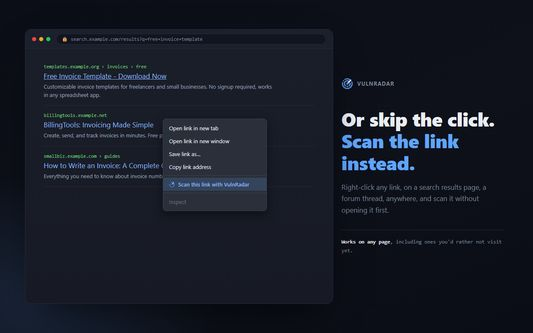
Right-click any link, anywhere, and choose Scan this link with VulnRadar. The scan runs against the link target without navigating to it, which is the point: you can check a search result, a forum post, or an emailed link before deciding whether to open it. It uses the same settings and the same daily limit as a popup scan, and finishes with the same desktop notification.
The on-page card
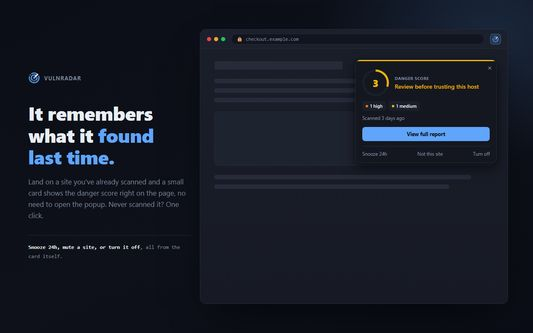
When enabled, a small card can appear in the corner of a page reporting one of two things: this host has been scanned before (and what its last result was), or it hasn't and you can scan it now. Site alerts are entirely separate from auto-scan below: this is about surfacing information, not triggering a scan on its own.
- Doesn't repeat itself: once you've seen the card for a host, it stays quiet on later page loads and tab switches to that same host for 24 hours, unless a new scan actually changes the result.
- Not this site: mutes the card for that host (or a URL pattern) permanently, from the card itself or Settings > Site Alerts.
- Snooze 24h: a temporary, self-expiring version of the same mute for one host.
- The known-result and scan-prompt halves of the card are each controlled by their own toggle in Settings, so you can keep one and turn off the other.
Auto-scan modes
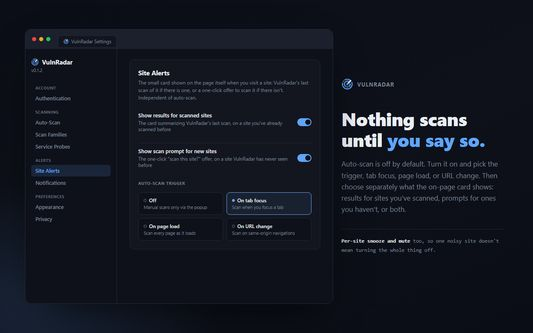
Off by default. Three modes decide when a scan fires without you clicking anything:
- On page load
- Scans a host the first time you land on it, throttled per host so repeat navigation on the same site doesn't re-trigger.
- On tab focus
- Scans when you switch to a tab showing a host that hasn't been checked recently, not on every load.
- On URL change
- Follows SPA/client-side navigation within a site, not just full page loads.
A whitelist/blacklist and a global pause are available in Settings for hosts or stretches of time you never want auto-scanned, regardless of mode.
Desktop notifications
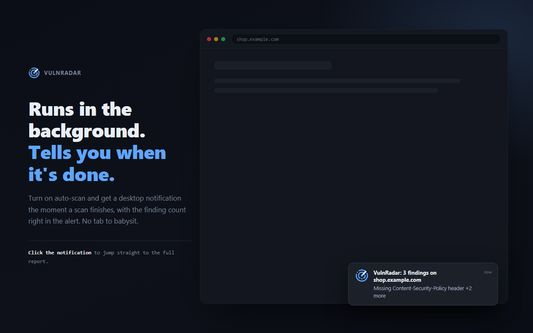
Any scan that wasn't started from the popup finishes with a desktop notification carrying the finding count and the worst issue, because a background scan you never look at is not worth running. Clicking it opens the full report. The severity threshold that decides whether a result is worth notifying you about is in Settings, so a site with three info-level findings can stay quiet.
Pages you're signed into
If the extension detects a session cookie on the current page (a heuristic against well-known cookie names, not a guarantee), the reputation card says so and links to authenticated scanning on the web app instead of prompting you to scan it directly. A regular scan always checks a site the way a logged-out visitor sees it (headers, TLS, cookies, DNS), which is a fundamentally different (and mostly incompatible) job from reading your actual authenticated DOM, so the extension doesn't try to capture and scan the signed-in page itself. For that, use the "Sign in first" option on the web app's scan form, which drives a real login for the scan.
Settings
Open the full settings page from the popup's gear icon. Everything above (check families, the port and service sweep, auto-scan mode and throttle, notification threshold, card position, mute lists, and theme) lives there and is stored locally in the browser, not on your account, so it's per-install rather than per-user. The sweep is one toggle now, not a per-service list: the old per-service panel serialised a probes array the API had already stopped reading, so configuring it did nothing.
Permissions and privacy
- Runs on every page (content script) so the on-page card and auto-scan work without a click first. It reads the page's URL and a same-origin session cookie name check; it does not read page content into anything that leaves your browser.
- Your API key is stored in the browser's local extension storage, sent only to VulnRadar's API, and never to any other origin.
- Nothing is scanned without either you clicking Scan or an auto-scan mode you turned on yourself.
- Fully open source, same license as the rest of VulnRadar. Read the extension's source in the GitHub repository.